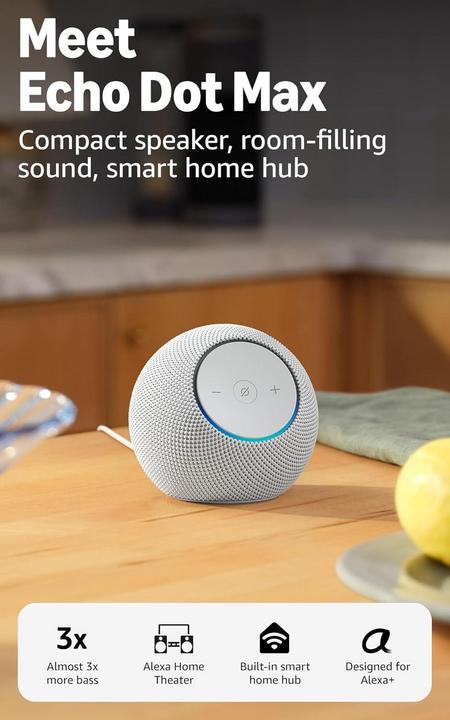
The Echo Dot Max delivers nearly three times the bass of a regular Echo Dot and aims to provide room-filling sound for living rooms and medium spaces.
It also includes a built-in smart home hub to control lights and locks without extra hardware and doubles as an eero Built-in mesh Wi-Fi extender.
Setup is simple using the Alexa app, the device offers Alexa+ conversational features and privacy controls, but some users report mixed reliability and connectivity.

Key specs for the Echo Dot Max
The Echo Dot Max combines stronger, room‑filling audio with built‑in smart home control and an eero mesh Wi‑Fi feature so you can replace a speaker, hub, and Wi‑Fi extender with one device; that matters because it reduces clutter and simplifies daily setup and control.
- Room‑filling sound: Larger drivers and tuned passive radiators for noticeably deeper bass and fuller midrange compared with a standard Echo Dot, designed for living rooms and medium spaces rather than just a bedside speaker.
- Built‑in smart home hub: Control lights, locks, and compatible devices directly from the speaker without needing a separate hub or bridge, making smart home routines easier to manage.
- eero Built‑in mesh Wi‑Fi: Acts as a Wi‑Fi extender/mesh node to improve coverage in parts of the house, which helps streaming stability and smart device connectivity.
- Alexa voice features: Far‑field microphones for hands‑free control, Alexa conversational improvements, multi‑room audio and stereo pairing with a second Echo Dot Max or compatible Echo speaker.
- Simple setup & app control: Quick setup and device management through the Alexa app, including smart home device discovery, room grouping, and sound tuning options.
- Design & finish: Fabric exterior with a discreet top status light and compact footprint so it blends into home decor; available in light color options like Glacier White.
- Connectivity & power: Requires AC power and connects over Wi‑Fi (supports standard home networks); also supports Bluetooth streaming for direct audio playback from phones.
- Privacy controls: Physical mic mute button and clear LED indicators for voice activity, plus on‑device controls in the Alexa app to manage privacy settings.
- Ideal use cases: Best for Alexa users who want better sound for music and TV, a built‑in hub to reduce extra hardware, and a simple way to boost home Wi‑Fi coverage.
In practice, these specs mean the Echo Dot Max sounds noticeably bigger than smaller Echo Dots, reduces the number of separate devices you need to run a smart home, and can improve Wi‑Fi reach—so it’s a practical single‑device upgrade for many living spaces.

Pros
-
Room-filling sound: Larger drivers and tuned passive radiators deliver deeper bass and fuller midrange than a standard Echo Dot, making music and TV audio noticeably richer in living rooms and medium spaces; it reliably fills typical 150–300 sq ft rooms without a separate soundbar.
-
Built-in smart home hub: Integrated hub lets you control Zigbee and compatible lights, locks, and sensors directly from the speaker, removing the need for a separate bridge and simplifying routines, automations, and everyday device control for non-technical users, and reduces setup time for households with many smart devices.
-
eero Built-in mesh Wi‑Fi: Functions as a mesh node or extender to boost coverage, which improves streaming stability and smart device responsiveness in weak-signal areas, reducing dead zones without buying a standalone mesh kit for small-to-medium homes and lowering audio dropouts during video calls.
-
Easy setup and control: Quick Alexa app setup, multi-room audio, Alexa conversational features, and on-device privacy controls make it easy to manage sound, devices, and permissions without a steep learning curve, and the app’s sound-tuning options let non-experts adjust bass and treble quickly.
Cons
-
Higher price point: Costs notably more than a standard Echo Dot, and for listeners who only need basic voice control or a bedroom speaker, the audio and mesh benefits may not justify the extra upfront expense, so look for sales or bundles to get better value.
-
Connectivity quirks reported: Some buyers report intermittent smart‑home device drops or inconsistent device discovery, which can require reboots or extra troubleshooting and undermines plug‑and‑play expectations for non-technical users; firmware updates generally help, but issues can persist and require patience.
-
eero redundancy: If you already own a full eero mesh system, the built‑in Wi‑Fi features add little value and can complicate network setup or produce overlapping nodes that need manual configuration, which can create confusing performance tradeoffs unless you carefully plan the network.
-
Not portable: The Echo Dot Max needs AC power and isn’t battery powered, so it must stay near an outlet and can’t be moved outdoors or used in temporary listening spots without extension cords; that limits placement flexibility compared with portable Bluetooth speakers.
My Personal Impressions
I picked up the Amazon Echo Dot Max and, honestly, the sound surprised me. The room-filling audio and nearly three times the bass compared to smaller Dots really make music and movies come alive in my living room. The Glacier White finish looks clean and fits my décor nicely.
Setup was straightforward — Alexa linked my smart lights and calendar in minutes, and the Dot Max handles multi-room audio without fuss. I like the responsive voice control, though sometimes it misses commands if the room gets noisy. Overall it’s quick to integrate, but not flawless in busy environments.
I will say there are trade-offs: the bass can be boomy at high volumes and can overpower vocals in smaller rooms. Some advanced features lean into the Alexa+ ecosystem, which felt like an extra layer to learn. It’s bigger and pricier than a standard Dot, so consider your space and budget.
All told, I ended up keeping the Echo Dot Max because its soundstage and bass filled my living room and made streaming more enjoyable. Privacy controls are available if you want to mute the mic, and the design is unobtrusive. If you want better Dot sound without full-size speakers, it’s a solid pick.

Getting the Most from Your Echo Dot Max
The Echo Dot Max combines stronger audio, a built‑in smart home hub, and eero Built‑in Wi‑Fi, so small setup choices change how well it performs in everyday use.
Setting it up right
Place the Echo Dot Max at least 2–3 feet off the floor and away from walls or corners to avoid muddy bass; a side table or a TV console center position works best for balanced sound throughout a living room.
During setup, prioritize connecting the device to your main Wi‑Fi band and, if you enable eero Built‑in, decide whether the Dot will act as a mesh node or remain a client; mixing modes on the same network can cause performance quirks, so keep the network plan simple.
Placement and acoustic tips
For clearer dialogue when watching TV, position the Echo Dot Max directly under or over the screen and enable any speech‑enhancement or EQ presets in the Alexa app; this emphasizes midrange frequencies for voices without boosting bass too much.
To avoid bass bleed or vibration, set the speaker on a solid surface and use small rubber pads if placed on glass or hollow shelving; these simple steps improve perceived clarity in rooms around 150–300 sq ft.
Keeping it updated and maintained
Regularly check for firmware updates in the Alexa app because many connectivity and hub‑compatibility fixes arrive through OTA updates; enable automatic updates if you prefer hands‑off maintenance.
Use the physical mic mute when you need privacy and periodically clear voice history in the app; also dust the fabric grille gently and keep the top status ring free of obstructions so voice activity LEDs remain visible.
How it compares to earlier Echo Dots and soundbars
Compared with a standard Echo Dot, the Echo Dot Max uses larger drivers and tuned passive radiators, giving a fuller soundstage that’s better suited for living rooms rather than bedside tables.
Against a dedicated soundbar, the Dot Max improves casual TV audio and dialogue, but it lacks the low‑frequency impact and virtual surround processing of a midrange soundbar; consider a soundbar if you want deep bass and cinematic dynamics.
Who this product actually fits
Buyers who want to reduce device clutter will value the combination of a Zigbee smart home hub and eero Built‑in mesh in one unit—especially households that run many Zigbee lights or sensors and lack a mesh Wi‑Fi system.
It’s less suitable for someone who already has a full eero mesh or a dedicated home theater setup; those users gain little from the Max’s Wi‑Fi or audio upgrades and may prefer targeted devices instead.
Real everyday use cases
Use the Echo Dot Max as a central living‑room assistant: stream playlists with fuller bass during gatherings, run morning routines that turn on lights and adjust thermostats with the built‑in hub, and place it near the TV to improve dialogue without adding a soundbar.
For apartments and small homes with weak Wi‑Fi spots, add a Dot Max in a central room to act as an extra mesh node and reduce dropouts for smart‑home devices and video streaming; this often solves intermittent connectivity without buying a separate mesh kit.
Echo Dot Max: Frequently Asked Questions Before You Buy
How much better does the Echo Dot Max sound compared to a regular Echo Dot?
The Echo Dot Max delivers deeper bass and fuller midrange than a standard Echo Dot and is tuned for living rooms and medium spaces (roughly 150–300 sq ft). It’s noticeably richer for music and TV but won’t match a dedicated soundbar or large floor-standing speaker for movie-level impact.
Can the Echo Dot Max replace a soundbar for my TV?
It can improve TV audio for casual viewing and dialogue, especially in small to medium rooms, but it’s not a full substitute for a proper soundbar if you want strong low end, virtual surround, or powerful home theater performance.
Does the Echo Dot Max include a smart home hub and which devices does it support?
Yes — the Echo Dot Max includes a built‑in smart home hub (Zigbee) so it can control many Zigbee lights, plugs, and locks without an extra bridge. It won’t directly support protocols like Z‑Wave or some proprietary bridges, so check device compatibility before buying.
What is eero Built‑in and do I need an existing eero system?
eero Built‑in lets the Echo Dot Max act as a mesh node or extender to help improve Wi‑Fi coverage. You don’t need an existing eero system to use it, but the built‑in feature is most useful in homes that lack a dedicated mesh; if you already own a full eero system, the benefit is limited and may require manual network setup.
What privacy controls does the Echo Dot Max offer?
The device includes a physical mic mute button, a top LED that indicates voice activity, and privacy settings in the Alexa app to review and delete voice recordings or limit features. These controls give basic on‑device and software options for managing privacy.
Are there any common problems I should be aware of before buying?
Some buyers report occasional smart‑home device drops or inconsistent device discovery that can require reboots or app troubleshooting; firmware updates tend to help. Consider these connectivity quirks, the higher price versus a regular Echo Dot, and your existing Wi‑Fi or audio setup before deciding.

Conclusion: Is Echo Dot Max Worth Buying?
If you want a single device that improves your living-room audio while consolidating smart home control and extending Wi‑Fi, the Echo Dot Max is a practical upgrade over a standard Echo Dot.
We recommend the Echo Dot Max because it delivers room-filling sound with larger drivers and tuned passive radiators, includes a built-in Zigbee smart home hub to control lights and locks without extra hardware, and offers eero Built‑in mesh Wi‑Fi to boost coverage in weak-signal areas.
If those three features match your needs, the Echo Dot Max is worth considering for living rooms and medium-size homes.