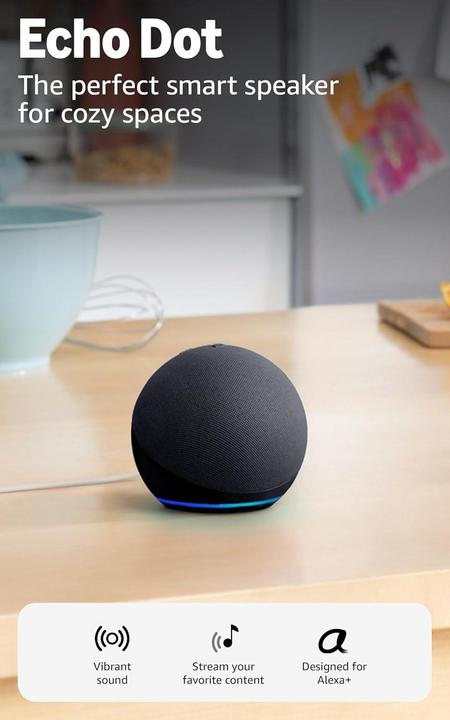
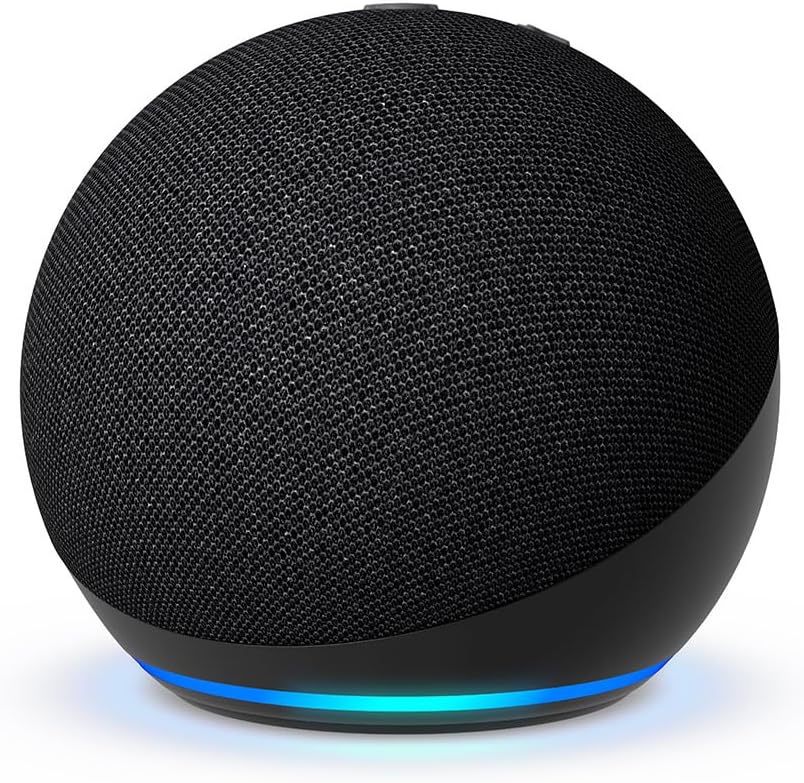
The Amazon Echo Dot Charcoal delivers bigger, clearer sound in a compact design that’s perfect for bedrooms, offices, and dining rooms.
It plays music and podcasts with surprisingly clear sound and works well as an easy alarm and smart home hub.
The Echo Dot also adds up to 1,000 sq ft of Wi-Fi with eero built-in and keeps your data private with a mic off button.

What the Amazon Echo Dot (Charcoal) actually offers
The Amazon Echo Dot (Charcoal) is a compact smart speaker built for small rooms where clear voice, simple automations, and extra Wi‑Fi reach matter more than booming volume.
These specs matter because they show how the Echo Dot balances size, sound, connectivity, and privacy for everyday use — clearer vocals for podcasts, sensors for automatic routines, and eero support to help weak Wi‑Fi reach bedrooms or home offices.
- Compact design: Small, fabric-covered puck that fits on nightstands, shelves, and countertops without taking much space.
- Improved speaker: Tuned for clearer vocals and fuller sound than earlier entry-level Dots, good for music, podcasts, timers, and voice calls.
- Alexa built-in: Full voice assistant with routines, timers, skills, and multi-room audio control.
- Motion & temperature sensors: On-device sensors enable simple automations (like turning lights on when you enter a room or adjusting routines based on temperature).
- eero Wi‑Fi built-in: Can extend Wi‑Fi coverage (advertised up to ~1,000 sq ft in many setups), helpful in homes with weak corners or single Echo acting as a mesh extender.
- Privacy controls: Physical mic off button and multiple layers of privacy controls in the Alexa app.
- Connectivity: Dual-band Wi‑Fi and Bluetooth for streaming from phones and connecting to other smart devices.
- Power: Plugs into AC power (no internal battery) for continuous home use.
In short, the Echo Dot (Charcoal) focuses on real-world usefulness: compact footprint for small spaces, sound tuned for speech and casual listening, built-in sensors for hands-off automations, and eero support to help improve Wi‑Fi where you need it.
Pros
-
Compact design: Small, fabric-covered puck fits easily on nightstands, shelves, and desks without cluttering the room, making it a practical bedside or office speaker that leaves space for lamps and books while still delivering dependable voice control and audio for everyday use.
-
Clear, tuned sound: Speaker is tuned for clarity, especially human voices and podcasts, offering fuller audio than earlier entry-level Dots so alarms, calls, and spoken content come through distinctly even in small to medium rooms.
-
Alexa routines and skills: Built-in Alexa supports routines, timers, multi-room audio, and thousands of skills, making the Echo Dot a flexible assistant for hands-free control, reminders, and simple automations without needing separate third-party hubs for basic tasks.
-
Motion and temperature sensors: On-device sensors enable practical automations like turning lights on when you enter a room or triggering routines based on room temperature, reducing manual steps and improving convenience for everyday smart home tasks.
-
eero Wi‑Fi built-in: Integrates eero mesh technology to help extend Wi‑Fi coverage in many homes, which can improve connectivity in bedrooms or offices and reduce dead spots when used with other eero devices.
-
Privacy controls: Physical mic-off button and app-level privacy settings provide straightforward control over listening functions, offering peace of mind for users who prioritize simple, visible privacy options.
Cons
-
Limited bass and volume: The small speaker delivers clear vocals but lacks deep bass and room-filling volume, so it won’t satisfy buyers seeking strong low end or loud playback for large living areas or parties.
-
Requires constant power: There’s no internal battery, so the Echo Dot must remain plugged into AC power, which limits portability and placement options compared with portable smart speakers with rechargeable batteries.
-
eero benefits vary by setup: The built-in eero feature can improve Wi‑Fi in some homes, but real-world gains depend heavily on the existing router, home layout, and whether you already use a mesh system, so results aren’t guaranteed.
-
Alexa account and cloud dependence: Full functionality requires an Amazon account and cloud services, which some users view as a privacy trade-off and can be limiting when internet access is intermittent or restricted.
-
No advanced smart-hub protocols: Unlike higher-end Echo models, this Dot lacks built-in Zigbee or advanced local hub features, so it may require extra bridges for some smart home devices and more complex integrations.
-
Occasional voice recognition issues: While generally accurate, Alexa can mishear commands in noisy environments or with overlapping speech, which can lead to frustrating repeated attempts for time-sensitive tasks or when multiple people speak at once.
My Personal Impressions
I picked up the Amazon Echo Dot (newest model) in charcoal and was surprised by how clear and lively the speakers sound for such a small device. It fills my bedroom with music without sounding tinny, and Alexa responds quickly. The design is compact and unobtrusive on my nightstand.
Setup was painless; I had it connected and controlling smart lights within minutes. Voice recognition is solid across the room and Alexa handles timers, weather, and quick searches smoothly. For what it is, the Dot is perfect in the dining room or office where you want hands-free control without a big speaker.
Not everything is perfect: the bass is limited, so if you like punchy lows the Dot feels thin compared to larger speakers. I also noticed occasional lag when multiple devices are online and Alexa sometimes misunderstands names. If privacy concerns you, remember you can mute the mic, but occasional wake-ups still bother me.
All in all, I’d recommend the Dot as a smart, affordable companion for bedrooms and small spaces — great for podcasts and casual listening. If you want booming, room-filling audio, pick a bigger Echo. For everyday voice control and compact sound, this Dot hits the sweet spot for me.

Tips, Brand Background, Comparisons, and Real Use Cases
This extra section gives practical tips for setup and maintenance, a short background on Amazon’s Echo line, comparisons with earlier models and rivals, who should buy it, and everyday ways to use the Echo Dot.
Practical setup and placement tips
Place the Echo Dot on a flat, elevated surface away from walls and large reflective surfaces for the best sound. Leave about 3–6 inches of clearance around the speaker so the microphone and grille are not blocked.
Because the Dot has no internal battery, plan for a nearby outlet and avoid tucking it into cabinets. For voice recognition, place it where people normally speak—hallway corners and closed cabinets reduce detection accuracy.
Maintaining and troubleshooting
Keep the fabric grille free of dust by gently vacuuming with a soft brush or using compressed air on low. Avoid liquid cleaners; a dry microfiber cloth is best for the plastic parts and top controls.
If Alexa acts up, try restarting the unit by unplugging for 10 seconds. Use the Alexa app to check updates and device health; a factory reset is usually done through the app or by holding the device buttons if a full reset is needed.
About Amazon and the Echo line
Amazon launched the Echo family in 2014 as one of the first mainstream smart speakers powered by Alexa. Over time, Amazon expanded the lineup from full-size Echo speakers to smaller Dots and feature-focused devices to cover more rooms and budgets.
Amazon also acquired eero (2019), which explains the deeper Wi‑Fi features on newer Echo models. That acquisition blurred the line between smart speakers and home-network devices for Amazon’s ecosystem.
The brand focuses on broad compatibility and frequent software updates, which keeps older devices useful but also ties many features to Amazon’s cloud services and accounts.
Comparison to earlier Dots and competitors
Compared with older entry-level Dots, this model improves speech clarity and adds motion and temperature sensors, which let you run local routines without extra hardware. The speaker tuning favors voices over heavy bass.
Against rivals like the Google Nest Mini or HomePod mini, the Echo Dot stands out for its eero integration and broader third-party skill ecosystem, but it lacks advanced local hub protocols such as Zigbee that some other Echo models include.
Who this product actually fits
This Echo Dot suits buyers who want voice control and simple automations in bedrooms, home offices, and small rooms—places where space is limited and full-bodied sound is less important than clear speech and convenience.
It is not ideal for buyers who prioritize deep bass, loud party-level volume, or an advanced local smart-home hub; audiophiles and large-room users should consider bigger Echo models or dedicated speakers.
Real everyday use cases
Use it as a bedside assistant for alarms, timers, and quick weather or calendar checks—the improved voice clarity makes spoken responses easier to hear without turning on a light. Motion-triggered routines are handy for automatic bedside lighting.
In a home office or small apartment, the Dot can play background music, handle calls, and help with hands-free timers. If you need better Wi‑Fi in one corner, the eero Wi‑Fi feature can help when configured with other eero devices.
Amazon Echo Dot (Charcoal) FAQ
How good is the sound for music and podcasts?
The Echo Dot is tuned for clear vocals and speech, so podcasts and audiobooks sound crisp in small rooms. It offers fuller audio than older entry-level Dots but lacks deep bass and won’t fill large rooms — choose a larger Echo or a Bluetooth speaker if you want louder, bass-heavy playback.
Will the eero Wi‑Fi feature actually extend my coverage?
Built-in eero can help extend Wi‑Fi in some homes when used with other eero devices or when set up as part of an eero network. Results vary based on your router, home layout, and existing mesh setup, so it’s not a guaranteed fix for every dead spot.
What do the motion and temperature sensors do?
The motion sensor detects activity to trigger simple automations like turning lights on when you enter a room. The temperature sensor can be used in routines to change behaviors based on room temperature. They’re useful for basic hands-free routines but are not replacements for dedicated sensors or thermostats.
How does the Echo Dot protect my privacy?
The device has a physical mic-off button that stops Alexa from listening. You can also review and delete voice recordings, adjust permissions in the Alexa app, and limit third-party skills. Keep in mind most voice processing and features rely on Amazon’s cloud services.
Can I use the Echo Dot without Wi‑Fi or an Amazon account?
Most features require a Wi‑Fi connection and an Amazon account to set up Alexa, run routines, and use skills. You can stream via Bluetooth to a previously paired device in limited offline cases, but the core smart features need an internet connection.
Is the Echo Dot portable and what connections does it have?
The Echo Dot has no internal battery and must stay plugged into AC power, so it’s not portable. It supports Bluetooth streaming and connects over dual-band Wi‑Fi. Newer Dot models typically do not include a 3.5mm line-out, so check the specific product listing for wired audio options.

Conclusion: Is Amazon Echo Dot (Charcoal) Worth Buying?
If you need a small, easy-to-place smart speaker that improves voice clarity and adds simple smart-home features, the Amazon Echo Dot (Charcoal) is a solid option.
The Amazon Echo Dot (Charcoal) is worth buying for its speaker tuned for clearer vocals and fuller sound, built-in motion and temperature sensors that enable hands-free automations, and eero Wi‑Fi integration that can help extend coverage in weak-signal areas.
It’s a practical way to add Alexa, basic automations, and improved Wi‑Fi reach to bedrooms, offices, or other small spaces.