
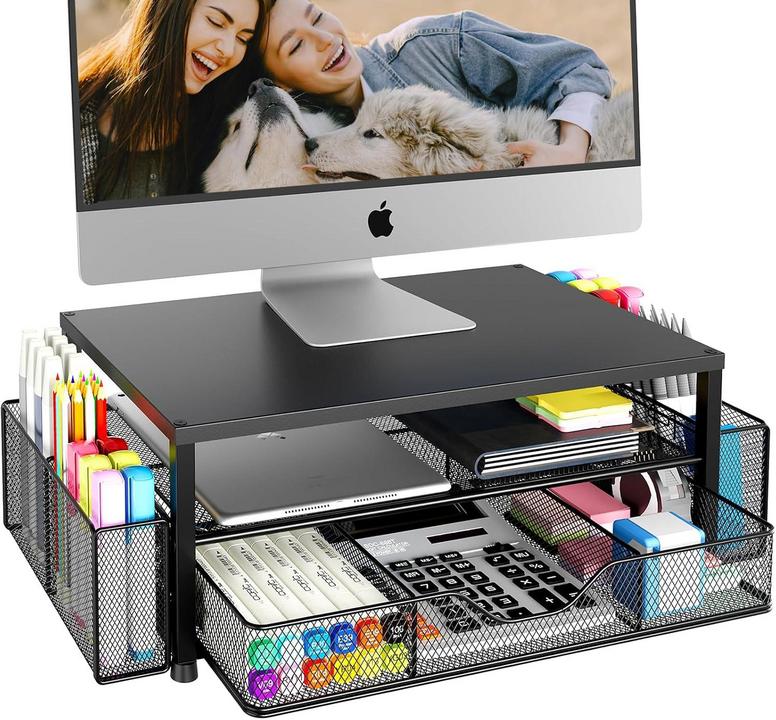
The OPNICE monitor stand is a 2-tier metal riser that raises your screen and includes a drawer plus two pen holders.
It holds up to 44 pounds and the powder-coated carbon steel frame feels sturdy and stable on most desks.
Assembly takes minutes with the included hardware, and the extra storage helps clear clutter and improve posture.

What the OPNICE monitor stand actually offers
This 2-tier metal riser is built to lift your screen, clear desktop clutter, and give quick access to small items; its most important details are stability, storage, and a compact footprint that fits most desks and monitors.
- Design: 2-tier elevated platform with open space underneath for keyboard and accessories.
- Material: Powder-coated carbon steel frame for durability and scratch resistance.
- Weight capacity: Holds up to 44 pounds (suitable for most single monitors and laptops).
- Built-in storage: Slide-out drawer for small items like cables, sticky notes, or chargers.
- Accessory holders: Two attached pen holders (hang-on style) for pens, stylus, or small tools.
- Stability features: Non-slip feet and a wide base help keep the stand steady on typical desks.
- Finish: Matte black powder coating that resists fingerprints and coordinates with most setups.
- Assembly: Quick assembly with included hardware; most users can set it up in minutes without special tools.
- Practical fit: Compact footprint and simple silhouette make it easy to add to home offices, dorms, or shared workspaces.
Why these specs matter: the steel construction and 44-pound capacity mean the riser supports heavier monitors and laptops safely, while the drawer and pen holders reduce desktop clutter so you can store small items out of sight but within reach — improving posture by raising the screen and freeing space for a keyboard and mouse underneath.

Pros
-
Sturdy steel construction: The powder-coated carbon steel frame supports up to 44 pounds, providing a stable riser for most single monitors and laptops; the heavy-duty build resists bending and feels solid under typical office use, so you don’t need to worry about wobble or sag over time.
-
Slide-out storage drawer: The included shallow drawer tucks small items like cables, sticky notes, and chargers out of sight yet within reach, helping reduce desktop clutter; it’s convenient for everyday desk essentials while keeping surfaces clear and organized.
-
Ergonomic 2-tier elevation: Raising your screen to eye level clears space beneath for a keyboard and mouse, encouraging a more upright posture and reducing neck strain; the fixed two-tier height is simple and effective for most seated setups.
-
Quick assembly and compact footprint: The riser assembles in minutes with included hardware and no special tools, and its modest footprint fits small home offices, dorm desks, or shared workstations without overwhelming desk surface area, while still leaving room for accessories like a mug or notepad.
-
Accessory holders and stability features: Two hang-on pen holders and non-slip rubber feet keep small tools organized and the stand reliably in place; these small touches prevent sliding and give quick access to pens or styluses during work or study sessions.
Cons
-
Fixed height, no adjustment: The riser offers a single two-tier height and lacks adjustable elevation, so it may not suit users who need fine-tuned screen positioning or taller monitor stands; buyers seeking variable ergonomics will need a different solution or a separate monitor arm.
-
Shallow drawer limits storage: The slide-out drawer is useful for small items but is shallow and narrow, so it won’t hold larger accessories, bulky chargers, or thick notebooks; if you need deep hidden storage, this riser’s drawer may feel too limited.
-
Small hang-on pen holders: The included pen holders work for pens, styluses, or small tools but are compact and hang-on style, which may feel flimsy or awkward for wider items and could detach if bumped.
-
No integrated cable management or arm mount: The stand doesn’t include channels or clips for routing cables and isn’t designed for VESA monitor arms, so cable clutter remains your responsibility and heavier arms won’t attach directly to the riser without additional accessories.
My Personal Impressions
I got this 2-tier monitor stand to clean up my workspace and it really delivered. It’s sturdy, looks professional, and only took a few minutes to assemble. Just a heads-up: measure your monitor’s base first so it fits properly — that’s the only habit I’d recommend before buying.
I actually liked it so much I bought a second one for work. The pen holders and side baskets are practical, and the drawer plus top shelf fits more than I expected. It’s adjustable and portable enough to move from couch to desk, which made my WFH setup much more functional.
Ergonomically it helps — I no longer look down at my monitor and can sit up straighter. I slid a cooling fan and laptop underneath and store my keyboard on top when unused. Assembly was simple with a screwdriver, though small items do tend to shift around inside the shallow drawer.
Overall I think it’s a great value — heavy-feeling material yet surprisingly light to move. The black finish looks sharp and the customizable pencil holder and middle rack let me configure it to my needs. If you’re short on space it’s compact enough for a printer or small cart, just double-check the dimensions.

Extra: Practical Tips, Comparisons, and Real Use Cases
This section gives hands-on tips, clear comparisons, and real-world scenarios to help you decide if the OPNICE monitor stand fits your desk and workflow.
Practical setup and maintenance
Start by assembling on a flat surface and tighten all fasteners so the riser sits level; the included hardware and quick-assembly design mean most people can finish in under 10 minutes. Make sure the monitor’s weight is below the 44-pound weight capacity and center the display to avoid uneven load on the frame.
For cleaning, wipe the powder-coated carbon steel surface with a damp cloth and mild soap; avoid abrasive pads or harsh solvents that can damage the finish. Periodically check the non-slip feet and drawer runners for dust or debris to keep the stand stable and the drawer sliding smoothly.
Comparison with monitor arms and other risers
Unlike a monitor arm, this is a fixed-height two-tier riser, so it raises your screen consistently but doesn’t allow fine-grain height or swivel adjustments. If you want variable ergonomics or multi-axis motion, a VESA arm is better; if you want a simple lift plus storage, the OPNICE riser is often quicker and cheaper.
Compared with lighter acrylic or wooden risers, the steel construction gives better long-term durability and handling for heavier displays. The built-in slide-out drawer and two hang-on pen holders add storage that many minimalist risers lack, though the drawer is shallow and not a replacement for full desk drawers.
Who this product actually fits
Buyers who will like this stand are people using a single 24–32 inch monitor or a laptop who want to raise the screen, clear space beneath for a keyboard, and store small items close at hand. Students, remote workers, and compact-office users benefit most from the combination of elevation and shallow storage.
This stand is less appropriate for users with very large ultrawide monitors, multi-monitor arms, or those needing adjustable height every day. If you require frequent repositioning or VESA arm mounting, a desk-mounted arm or fully adjustable riser is a better match.
Everyday use cases
In a typical home office, place the riser to lift the monitor to eye level and slide a full-size keyboard under it when not in use to reclaim desk space. Use the slide-out drawer for cables, sticky notes, and chargers, and keep pens in the hang-on holders for quick reach during calls or note-taking.
For hybrid laptop+monitor setups, put the laptop to one side on the riser or on the lower tier for secondary screens, while using the top surface for the main monitor. The compact footprint and sturdy build make the stand useful on small desks, dorm rooms, or shared workspaces where space efficiency matters.
OPNICE Monitor Stand — Frequently Asked Questions
How much weight and monitor size does the OPNICE stand support?
The stand supports up to 44 pounds, so it handles most single monitors and laptops. Typical 24–32 inch monitors are well within limits; very large ultrawide or heavy professional displays may exceed the footprint or weight capacity, so check your monitor’s weight before buying.
Is the height adjustable?
No — this is a fixed two-tier riser rather than an adjustable stand. It raises screens to a moderate ergonomic height; if you need fine-tuned height changes or tilt adjustment, pair it with a monitor arm or choose a height-adjustable stand instead.
Does the stand include cable management or VESA/arm mounting?
No — the riser doesn’t have built-in cable channels or clips, and it isn’t designed for direct VESA arm attachment. You can use third-party cable clips or an under-desk tray to organize cables, and a separate monitor arm can be mounted to the desk if needed.
What can the slide-out drawer hold, and will a keyboard fit inside?
The slide-out drawer is shallow and best for small items like cables, sticky notes, pens, and chargers. It won’t fit a full-size keyboard. The open space under the riser is meant to store a keyboard and mouse when not in use.
How hard is assembly and what tools are required?
Assembly is straightforward and usually takes only a few minutes with the included hardware. A Phillips screwdriver is typically all that’s needed; no special tools or professional help are required for most users.
Is the finish durable and easy to clean for office use?
Yes — the powder-coated carbon steel finish resists scratches and fingerprints and works well in home or office settings. Wipe it with a damp cloth and mild detergent for cleaning, and avoid harsh abrasives that could damage the coating.

Conclusion: Is OPNICE monitor stand Worth Buying?
Deciding whether this riser is right for you comes down to whether you want a fixed-height platform that raises your screen, frees up desk surface, and stores small items within reach.
OPNICE monitor stand is worth buying when you need a sturdy two-tier riser because it offers a 44-pound weight capacity, powder-coated carbon steel construction, and a slide-out drawer for small-item storage.
If those specifics match your setup, the stand will reliably raise your monitor, reduce clutter, and provide stable everyday use.